For flower exporters
Every order checked.Entered without retyping.
Emails, PDFs, Excel, photos and portals in one place. Your team only reviews what does not match.
- Orders in any format and language, read in seconds
- Prices and holidays checked per customer
- Entered in your ERP, even without an API
- 85 % of orders
- reach your system without manual work
- 25+ years
- building software and integrations
- 2–3 weeks
- to a pilot with your real orders
Sound familiar?
Orders arrive from everywhere.
One customer sends a PDF, another an Excel file in Polish, another emails the sales rep, and the big ones have their own portal. Every order is typed in by hand, with overtime in peak season, and mistakes show up once the boxes have shipped.
“We copy orders from email into the system by hand.”
The platform reads the document, recognizes the customer and enters the order in your system.
“Every day we log into ten portals to look for new orders.”
The platform checks your customers' portals every hour and brings in new orders.
“A wrong price shows up only after invoicing.”
Every line is compared with the customer's price list, including the holiday surcharge.
“Changes arrive by email and get lost between messages.”
Every change is matched to its order, with before and after, and your team confirms it.
The platform
From email to entered order.
Five steps your team does by hand today. The platform takes over the routine, your team keeps the decision.
Receive
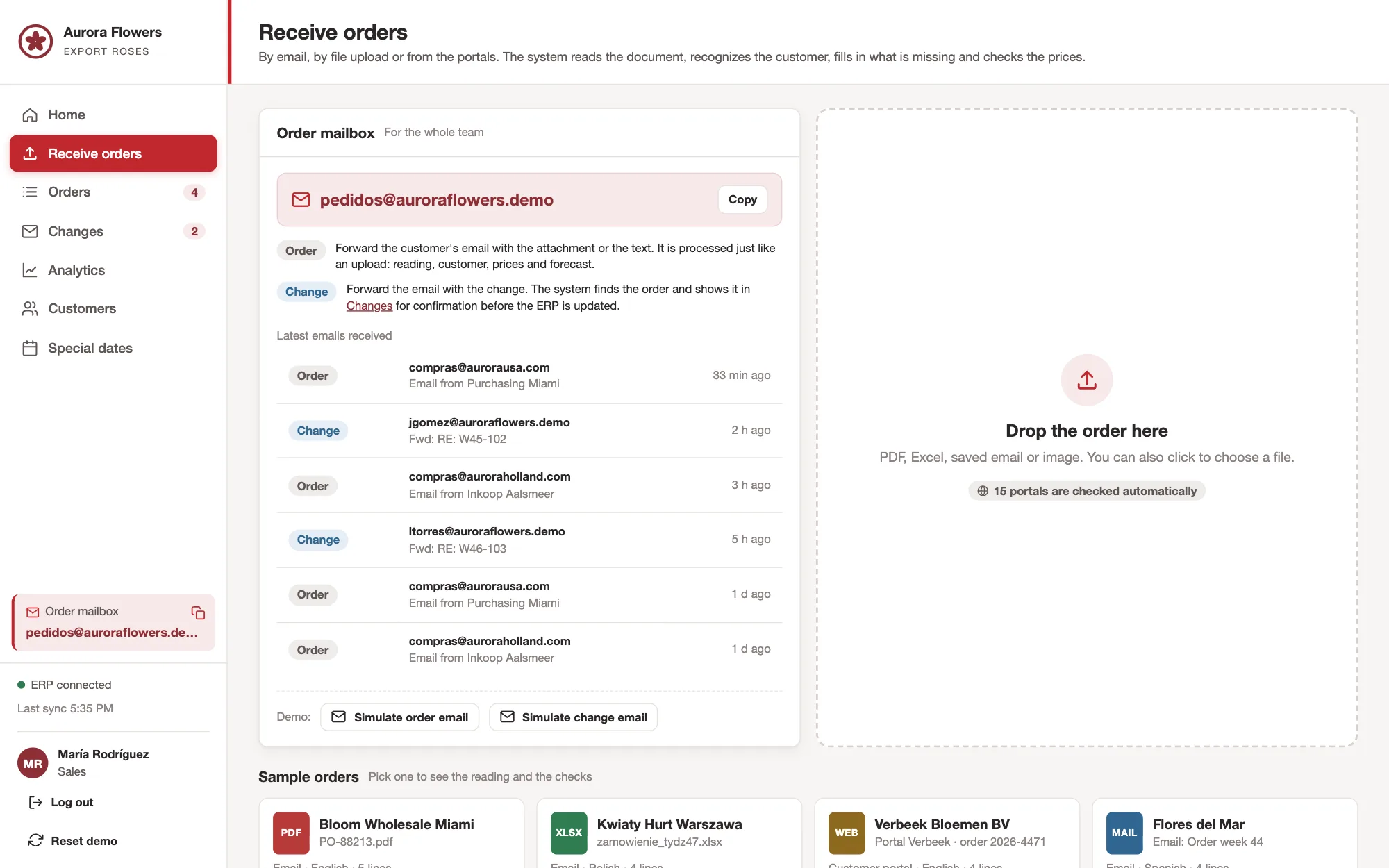
All orders in one place.
Your team forwards orders to a central address or drags them into the platform. Your customers' portals are checked automatically, including those that need a username and password.
- Email, PDF, Excel, Word and a photo of a handwritten order
- Customer portals checked every hour
Read and complete
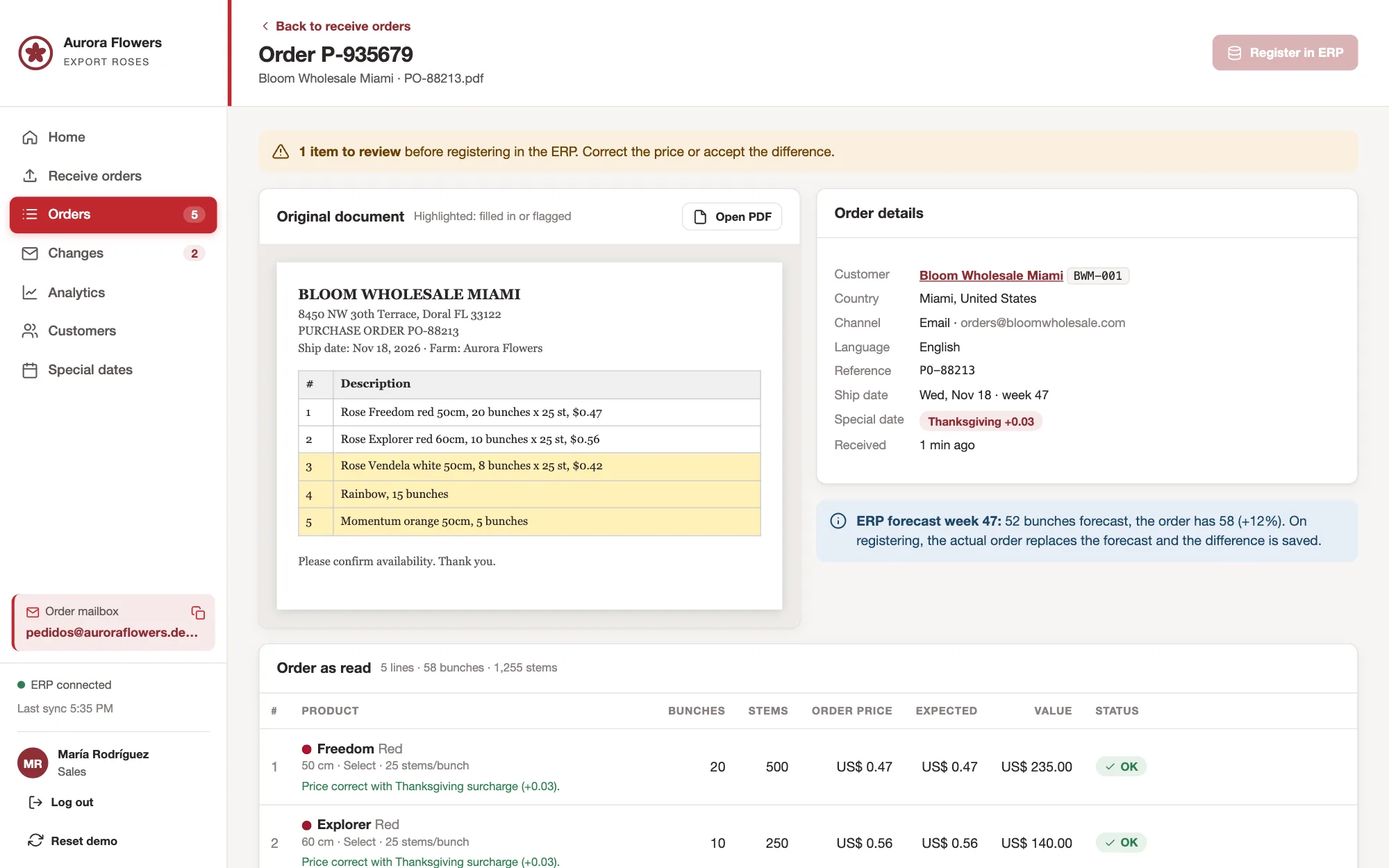
Read in seconds, in any language.
The platform reads the document, recognizes the customer and fills in what is missing from history: variety, color, length, grade and bunches per box. The original document stays stored with the order.
- Orders in English, Spanish, Polish and more
- Mixed bunches such as rainbow, set up per customer
Check and enter
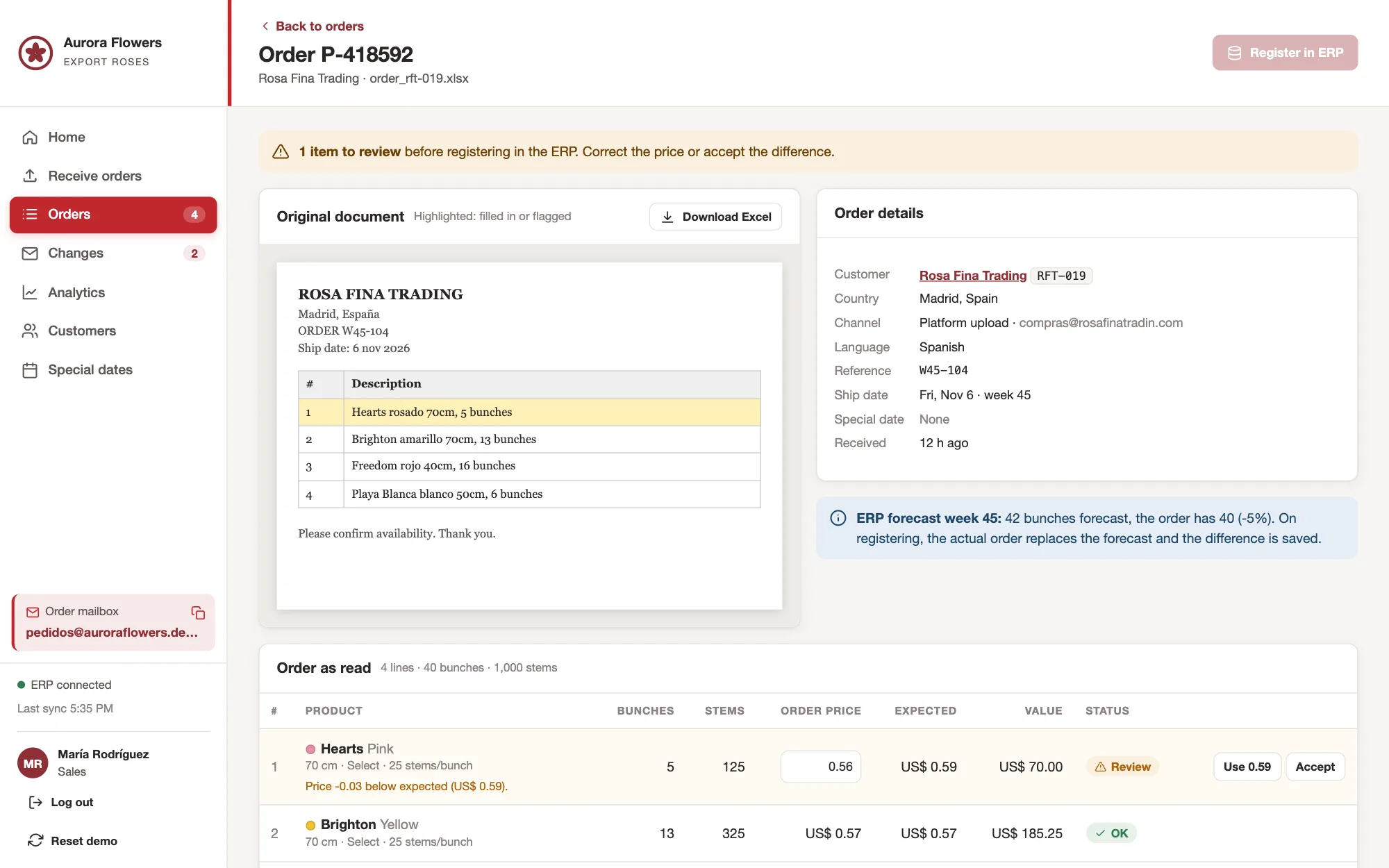
Review only what does not match.
Every line is compared with the price agreed with the customer and with the holiday calendar. If something does not match, the platform flags it, and your team corrects or accepts it with one click. Then the order goes into your system, without retyping.
- Price per customer and holiday surcharge
- Entered in your ERP, even without an API
Changes
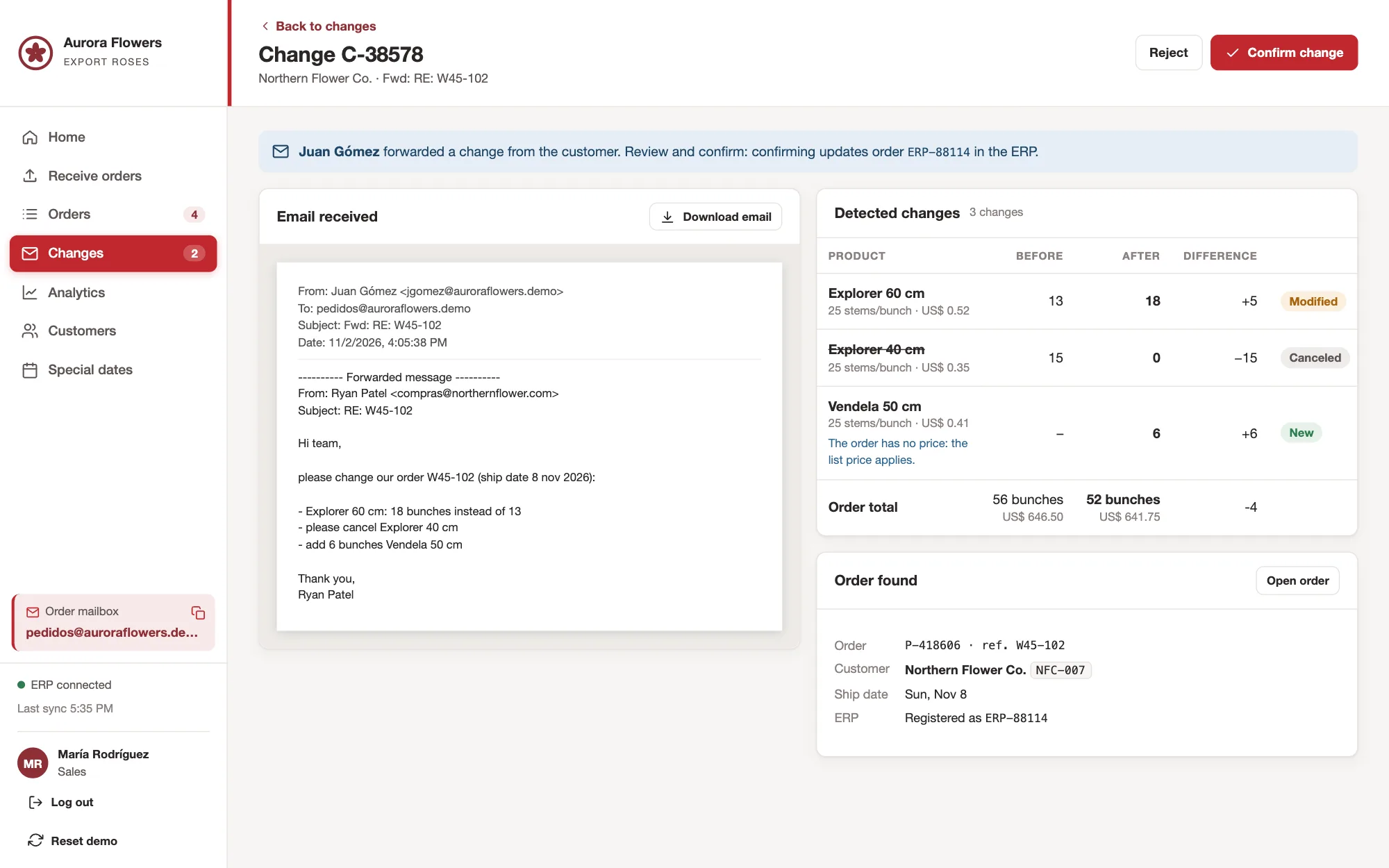
Changes by email, with confirmation.
When a customer changes quantities, cancels a variety or adds one, the platform finds the order and shows before and after. Your team confirms, and the order is updated in your system.
- Every change matched to its order
- Nothing changes without your team's confirmation
Holidays and forecast
Peak season under control.
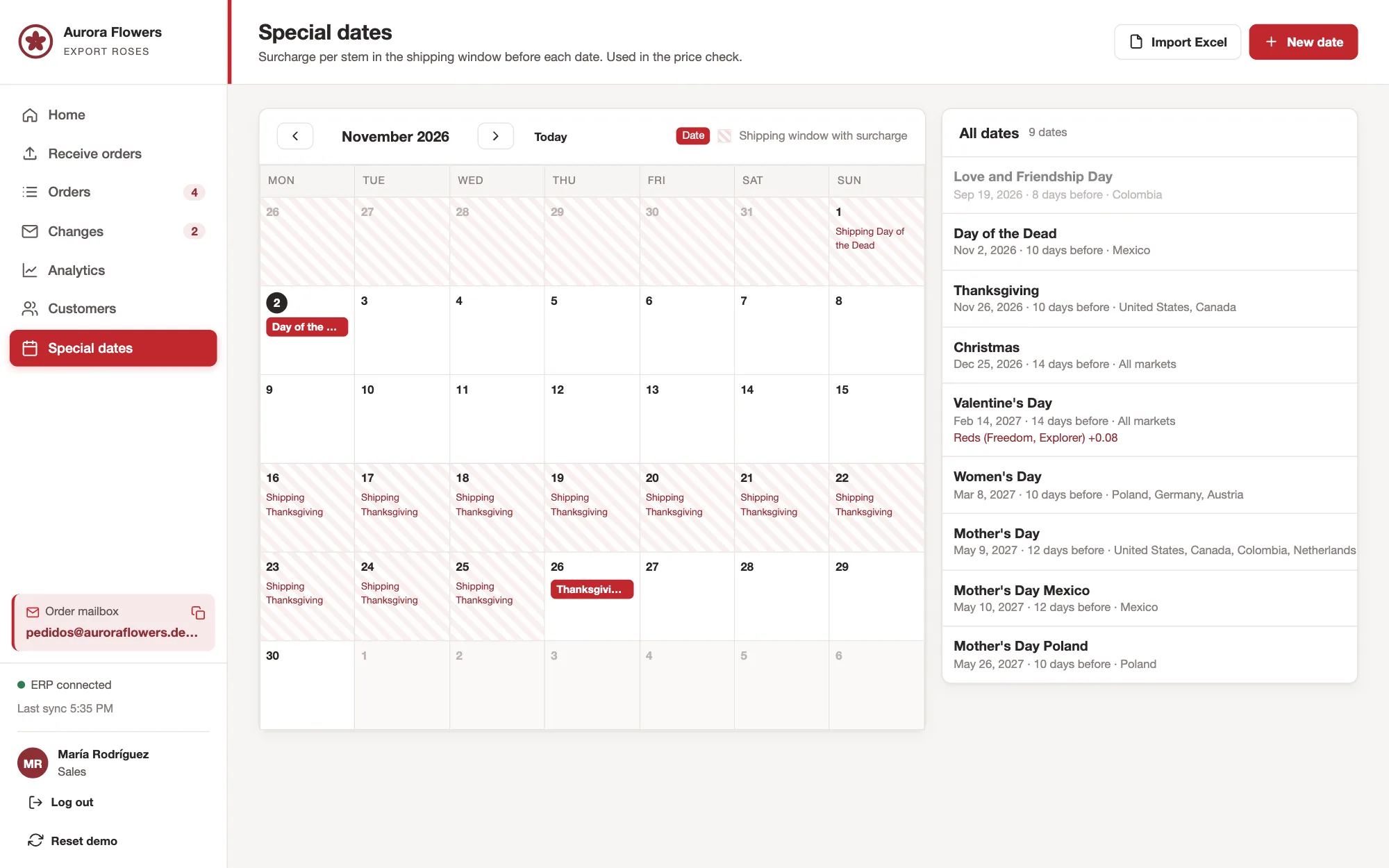
Valentine's Day, Mother's Day, Thanksgiving or Día de Muertos: every holiday has its shipping window and surcharge, per market. The forecast from your ERP is replaced by the real order, and the difference is kept.
- Holiday calendar per market
- Forecast measured against every real order
Control
The platform works. Your team decides.
A wrongly entered order costs flowers, freight and customers. So the platform does not guess: anything unclear goes to your team.
Who approves a different price?
Always a person on your team. The platform shows the order price next to the expected one.
What happens with unusual cases?
If data is missing or an order cannot be read reliably, it goes to the review list with the reason.
Can we see later what happened?
Every order keeps the original document, what the platform read and who confirmed what.
How we start
From the first conversation to a running platform.
We start with your real orders, not with examples. Each step ends with a result, and you decide whether we continue.
30 minutes
First conversation
We show you the platform, and you tell us how orders arrive and are entered today, and where time gets lost.
ResultAn honest assessment of whether it pays off for your company
2 to 3 weeks
Pilot with your orders
We start with real orders from your current customers, for example those that arrive as PDF and Excel, and enter them in your system.
ResultReal orders that arrive correctly in your ERP
After the pilot
All channels
We add the central address, your customers' portals, changes by email and the holiday calendar.
ResultAll orders in one place
Ongoing
Operation and support
If you like, we run the platform for you: backups, monitoring, updates and adjustments when a new customer or portal comes along.
ResultAn order intake that stays up to date
Experience
The same technology also works in your other departments.
Long before AI agents existed, we were building software and connecting systems. That experience decides today whether AI works in daily operations: only the connection to your programs, your data and your rules makes it part of the process.
The platform behind the order intake fits wherever documents arrive that have to be checked and entered. For our customers it processes, for example, tax documents or the correspondence of a property manager.
Works with your systems
- Floriculture ERPs such as Komet Sales or FreshPortal
- Microsoft 365 and Google Workspace
- Customer portals with username and password
- Web tools, even without an API
- Email, PDF, Excel, Word and photos
- Holiday calendar in Excel
Frequently asked questions
What exporters ask us.
Which orders can the platform read?
Orders by email, as PDF, Excel or Word, photos of handwritten orders and orders from your customers' portals. The language does not matter: English, Spanish, Polish or whatever your customers use.
Does it work with our ERP?
We connect the platform to the system where you enter orders today. If it has an API, we use it. If not, we write directly to the database or work through the web interface. In the first conversation we look at the options in your case.
What happens if an order cannot be read reliably?
It goes to the review list with the reason, and your team completes it. Nothing reaches your system until it is clear.
Where does our data stay?
On your own server, in your cloud account or on your premises. Which data the software may see and which AI model is used, we decide together.
How long until it is running?
The pilot with real orders takes 2 to 3 weeks. The full platform with all channels is usually ready in about 8 weeks, depending on the number of portals and the connection to your ERP.
What does it cost?
It depends on the number of orders, your customers' portals and the connection to your system. After the first conversation you receive a concrete proposal for the pilot.
Request a consultation
How many hours does your team spend typing orders each week?
A few details are enough. In the first conversation we show you the platform and tell you honestly whether it pays off for your company.



Nataly, David and Markus read your request personally. One of us will get back to you.